Monday, October 20, 2014

Using SQL: Group by join

(Postdated lecture/handout on SQL. This uses a Navicat Essentials and a dataset that was loaded on lab machines.)
SQL - Aggregation, grouping and joining


We're going to move to using MySQL on a local computer now. The data we are going to use should already be loaded onto the lab machines (please use lab machines today.) If that fails for whatever reason the data is in Mode as "utdata.msa2013" though the column names are a little different.


Throughout these handouts SQL syntax has been written out so you have a record of what different things do. I HEAVILY ENCOURAGE YOU TO TYPE IT OUT AND NOT COPY/PASTE. You will learn more if you make typos and mistakes along the way and have to figure out why and correct it.

Alcohol tax receipts

Our next section is going to use a set of data from the Texas Comptroller's office called the "mixed beverage gross receipts tax." Basically, the state takes a cut of every alcoholic drink sold over the counter by a bartender or waiter. (This does not include beer or liquor you buy at a package or grocery store, which is instead taxed under normal sales taxes, and not definable against any other food stuff you buy.) With the gross receipts, we can find out who sells the most alcohol by the drink.


The table "receipts" is our main data, but we are going to start with a subset "msa2013" which is a table of just the records for one year from Hays, Bastrop, Travis and Williamson counties.


  • Launch Navicat
  • If you don't see "localhost" in the left-hand column
    • Go to Connection, choose MySQL
    • Click OK on the window that opens
  • Double-click on "localhost"
    • leave the password blank and hit OK. These machines have the root password set as blank.
    • If you downloaded MySQL in class, your root password was saved on the desktop of your machine
  • Double-click on "utdata" to open that database.


Double-click on the msa2013 table and it should open so you can see the columns we can take a look at it. (We'll talk about what each one means.)

How many records are in msa2013?

If you ever think you have a 1000 records on a query, be suspicious. Remember the row limit in Mode? It is present in Navicat as well. You can turn off or change the row limit in Preferences if you need to, but we won't.

Build a query

Click on Queries under "alcohol", and then the + button at the bottom of the screen. Now we can type in our query:


SELECT count(*)
FROM msa2013


You are counting how many records match *, which is everything.


SAVE THIS SEARCH AS "msa2013count"  and take a screenshot of your SQL and results and submit them with the answer to this question in the assignment. How many records are in the msa2013 table?


That would be a lot of records to sort or filter in Excel, and that is just four counties for one year. The full "receipts" table has 10 years of data for all counties in Texas. Care to guess how many rows that might be? Well, don't. Figure it out for sure and tell me!

How many restaurants do we have? Using DISTINCT.

We can get a list of all the restaurant names by searching for DISTINCT names.


SELECT DISTINCT locname
FROM msa2013


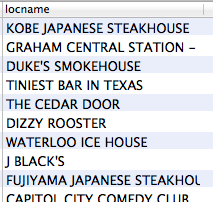
It should look something like this:


And you should get 584 names.


If you didn't need to see the actual names but just wanted to know how many there were, we could count for just distinct locnames:


SELECT count(DISTINCT locname)
FROM msa2013


And your return would just be the number: 584.


Now … looking at your data, do you think there are 584 different restaurant locations? How might you find out how many unique locations there are?


SELECT DISTINCT
locname,
locaddress
FROM
msa2013
ORDER BY
locname


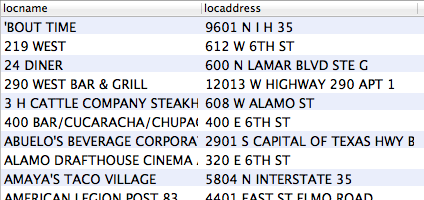
Now we have 694 records.


I ordered them by locname so you can see how the names might be the same for different addresses. In our previous query, we were counting different restaurant locations as the same because they had the same distinct locname. This is an important concept to understand and it means you need to understand what fields in your database are unique to each record.

AGGREGATE FUNCTIONS: SUM to add values together

OK, now we get to some power out of this database. Let's find out which locations (name & address) sell the most alcohol!


SELECT DISTINCT
locname,
locaddress,
SUM(grossreceipts)
FROM
msa2013
GROUP BY
locname,
locaddress
ORDER BY
SUM(grossreceipts) DESC
Let's break this down:
  • with grossreceipts inside the SUM statement, we are adding all the values of grossreceipts for this query.
  • with the GROUP BY statement, we are grouping all our returns where locname and locaddress are the same. This is important. You must always have a GROUP BY statement if you ask for any other field with an aggregation function like SUM or AVG, MIN, MAX, COUNT.
  • with the ORDER BY statement, we are ordering the returns by the SUM in DESCENDING order (DESC for short). The default order is ASC or smallest at top.


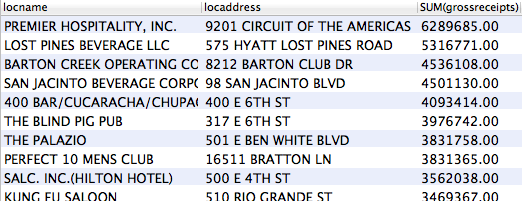
It looks like this:


An aside: Using an alias

Now we are going to simplify this statement just a little, and introduce a nice concept called an alias. I hate retyping SUM(whatever) each time, so I'm going to create an alias for that value called "TotalSales", but I don't have to put it in quotes because I'm not using any spaces. I can use this alias to refer to that value later, like in the ORDER BY field below.


SELECT DISTINCT
locname as Location,
locaddress as Address,
SUM(grossreceipts) as TotalSales
FROM
msa2013
GROUP BY
locname,
locaddress
ORDER BY
totalsales DESC


You can do this with almost anything, and it comes in handy with more complicated queries. If you don't have spaces, you can just write the word. If you add a space, you would then have to put it in quotes and this can do crazy stuff depending on your databases. (If you did it with MySQL/Navicat like we have here, it would change the value of that field to a string instead of a number and your order would be different. So … don't alias with spaces!)


SAVE THIS QUERY AS "top locations" and take a screenshot of the SQL and results for the following quiz question: What is the name, location and amount of the 2nd highest sales location? You'll submit that in the assignment.

INNER JOIN brings multiple tables together

Our data set includes establishments from multiple counties, but if you look at the data the "loccounty" is just a number. Luckily, this data comes with a lookup table to find the county name that matches this number.


Double-click on the table "counties" and take a look. Note the "code" column … the number here matches the "loccounty" column in the msa2013 table. We can bring these two tables together with a JOIN. (Reference on MySQL, or  W3, which I think is clearer.) We'll make the join, and add fields to the SELECT statement for the code and county from "counties."


SELECT
msa2013.locname,
msa2013.locaddress,
msa2013.loccounty,
counties.code,
counties.county
FROM
msa2013
INNER JOIN
counties ON (msa2013.loccounty = counties.code)


When you call fields from more than one table, it is good practice to refer to both the table and the field to avoid conflicts. (You might have fields of the same name in both tables.)


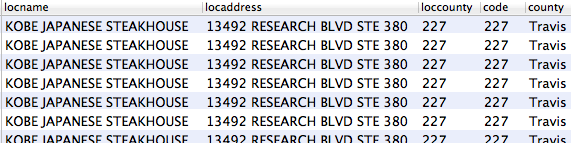
Voila! Now we have the county name of each record.


Now, DOUBLECHECK YOUR NUMBER OF RECORDS. There should be 7915, the same as your total records. Joins can be tricky. If your lookup table has more than one match, then you might get more records than you bargained for. We'll deal with that in a bit.

More SUMs!

Now let's find out which county sold the most booze.


SELECT
counties.County,
sum(msa2013.grossreceipts) as TotalSales
FROM
msa2013
INNER JOIN
counties ON (msa2013.loccounty = counties.code)
GROUP BY
counties.county
ORDER BY
totalsales DESC


Let's break it down:
  • We are asking for the "counties.County" field. Remember the table is listed first, then the field. I capitalized County to make it pretty in the results.
  • In our second field, we are summing the "msa2013.grossreceipts" and calling it TotalSales.
  • Our main table is msa2013, so that's our FROM
  • We are using an INNER JOIN to connect to the table "counties". An INNER JOIN finds only the records that are a match in both tables.
  • We are matching on the "msa2013.loccounty" in our first table, and "counties.code" in the second.
  • Since we have a SUM, we must also GROUP BY all the non-aggregate fields in the SELECT statement. That's counties.County in our case.
  • And we order by TotalSales descending to get the most sales on the top.


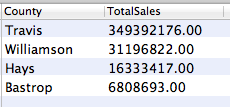
The result:


Travis county sells the most. No surprise there, since they have the highest population. But do they sell the most alcohol per person? To find out, we would have to know the populations of those counties. We have a table for that with "populations." Double-click on it and take a look. This also has a "code" field for the county, and the name, and the population! We can use this table, and then do some awesome math. First, let's get the population in our query. Try this:


SELECT
population.County,
population.Population,
sum(msa2013.grossreceipts) as TotalSales
FROM
msa2013
INNER JOIN
population ON (msa2013.loccounty = population.code)
GROUP BY
population.County,
population.Population
ORDER BY
totalsales DESC


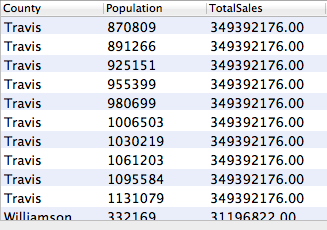
What is wrong with these results?


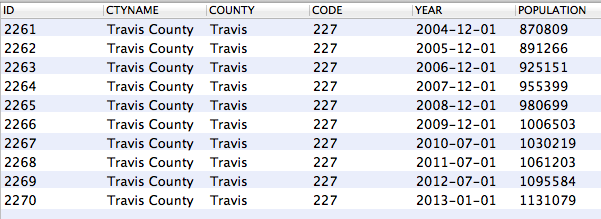
Since our "population" table has a Travis record for each year from 2004 to 2013, we are getting a result for each of those. Before we go off and fix it, let's look at all the Travis county records in the population table. Start a new query:


SELECT *
FROM
population
WHERE
county = "Travis"


You can see there is a record for each year's population. We can fix or original statement with a WHERE statement to to get just the year 2013-01-01.


SELECT
population.County,
population.population,
sum(msa2013.grossreceipts) as TotalSales
FROM
msa2013
INNER JOIN
population ON (msa2013.loccounty = population.code)
WHERE
population.year = "2013-01-01"
GROUP BY
population.county, population.population
ORDER BY
totalsales DESC


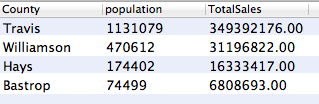
This is the result you want:


An aside: Dates in SQL

At the risk of confusing things, there are lots of things you can do with dates. You can look at references at W3 and the MySQL site. One that I use a lot is to extract the year from a date, which allows me to get all the records within a given year, even if the dates fall throughout that year. So you might write the WHERE part of the above query like this:


WHERE
YEAR(population.year) = "2013"


Back to sales per population

OK, now that we have the total sales and the population, we can do some match within the query to get the amount sold per person:


SELECT
population.County,
population.Population,
sum(msa2013.grossreceipts) as TotalSales,
(sum(msa2013.grossreceipts)/population.population) as SalesPerPerson
FROM
msa2013
INNER JOIN
population ON (msa2013.loccounty = population.code)
WHERE
YEAR(population.year) = "2013"
GROUP BY
county, population
ORDER BY
SalesPerPerson desc


SAVE THIS QUERY AS "county2013" and use it to answer the in-class assignment question: What is the sales per person in Travis county for 2013?. Take screenshot of the query and the result.


ON-YOUR-OWN QUEST:
The only difference between the table "msa2013" and the table "receipts" is msa2013 is for only the Austin area. You should be able to use a very similar query to the one above against the "receipts" table to find the sales per person in 2013 for every county in the state.


So … what are the top five counties in the state for sales per person in 2013? Submit a screenshot of the results that shows the county names, their values (rounded to nearest penny) and a screenshot to the homework assignment. Submit the SQL query and a screenshot of the results.


To get the rounding, you will have to search the internet on how to do that in MySQL. Think about how you might write the google question, and/or think about what sources we've used above when talking about specific MySQL syntax.

-- 30 --

Wednesday, October 15, 2014

Using SQL: The Select statement, using Mode Analytics

(Postdated lecture notes/handout)

SQL: SELECT FROM WHERE ORDER BY

Throughout these handouts SQL has been written out so you have a record of what different things do. I HEAVILY ENCOURAGE YOU TO TYPE IT OUT AND NOT COPY/PASTE. You will learn more if you make typos and mistakes along the way and have to figure out why and correct it.

There aren’t that many commands in SQL, and you can guess what they do by looking at them.

SQL commands
  • SELECT
    • used to find data
  • INSERT
    • used to add data
  • UPDATE
    • used to change data
  • DELETE
    • used to remove data

SELECT is your workhorse. You’ll build your SELECT statements with some basic keywords:
  • SELECT
    • followed by the fields you are looking for
  • FROM
    • the table (or tables) where your are looking
  • WHERE
    • certain conditions exists.
  • GROUP BY
    • deals with how you combine data
  • HAVING
    • allows you to filter data after it is grouped
  • ORDER BY
    • the sorting order your want your data

SELECT and FROM are required.

The syntax is a lot like English, so at it's basic level it is simple to understand, but it can do a lot.

SELECT
 name,
 address,
 hometown
FROM
 customers
WHERE
 hometown = 'Austin';

That says give me the name, address and hometown of all the customers that have a hometown of Austin. Simple, right?

The SELECT basics

We are going to use ModeAnalytics to learn basic SQL. Log into Mode. (You should've gotten an invitation from me already and already have created a login.) Click on New Query.

For the following exercise, we are going to use a table called "est2013_48" in the schema "utdata." It sometimes helps to have the table open to reference, so in a new browser tab go to this url:


Using SELECT to view everything

We are going to query some population estimate data that is already uploaded into Mode. Type in the following, and then click Run.

SELECT *
FROM utdata.est2013_48;

What it means

  • SELECT means to find, and it is followed by what fields you want. In this case, we want every field, so we are using the wildcard *
  • FROM utdata.est2013_48 means to look in the schema “utdata” for the table “est2013_48”.
  • The semicolon at the end of the statement says that it is ended. It’s like -30- at the end of a story. (Wait, you youngsters probably don’t get that.)

(I’ll take a minute to explain what each column means in this data set because I know the data, but I’m not going to write it out here.)

Using LIMIT

Did anyone notice how many results we got? Do you think there are only 100 records in this data set?

LIMIT saves you time by only returning a limited number of records. SQL managers like Mode and MySQL Workbench set a base limit by default, but you can override it.

Click off the “Limit 100” button at the top of the Mode window and see how many records you get. Should be 3102.

You can also set the limit within your query:

SELECT *
FROM utdata.est2013_48
LIMIT 2000;

Adding the LIMIT to your query will override Mode’s “Limit” button. For now, you can turn that button back on and set it to 100.

Use SELECT for just some information

But maybe we don’t want to show every columns. Maybe we only want the fields for the city name and estimates for each year. So the fields we need are: name, estimatesbase2010, popestimate2011, popestimate2012, popestimate2013. So we will select those by name, separating them with a comma.

SELECT
 name,
 estimatesbase2010,
 popestimate2011,
 popestimate2012,
 popestimate2013
FROM
utdata.est2013_48;

You’ll see that I’ve indented some of the lines. This is good coding practice because it helps you discern what goes where and why.

Setting column header names

Your data may have long or hard to understand names with not spaces, etc, but you can rename them by using as "New Name" in your query. Use double quotes for these names:

SELECT
 name as "City",
 estimatesbase2010 as "2010",
 popestimate2011 as "2011",
 popestimate2012 as "2012",
 popestimate2013 as "2013"
FROM
utdata.est2013_48;
What we are doing here is just changing the name of the column that is displayed.

Syntax differences

I may have mentioned somewhere that SQL syntax may differ depending on the database and client you use, and that comes into play here. Mode wants us to use double quotes when when we are referencing column names, and single quotes when we are representing values within the data, which we do below. This is different than MySQL/Navicat, where you can call values in double quotes. You just have to deal with the nuances. (For instance, I sent a support ticket into Mode when I wanted to fine the name value 'CHILI'S GRILL & BAR' because the query got confused with the apostrophe in CHILI'S. The answer was I used two apostrophes inside the quotes: 'CHILI''S GRILL & BAR' …which looks like a doublequote, but isn't. Confused? Yeah, me, too.)

Let's add some ORDER (BY)

ORDER BY is the term for sorting in SQL. You'll notice that our cities are in no particular order at all, and some are repeated but not together. It's kind of a mess. Let's ORDER BY name.

SELECT
 name as "City",
 estimatesbase2010 as "2010",
 popestimate2011 as "2011",
 popestimate2012 as "2012",
 popestimate2013 as "2013"
FROM
 utdata.est2013_48
ORDER BY
 name;

Using WHERE to filter data

What if we don’t want all the data? What if we only want certain data where a condition is true?

Did anyone notice that some cities are listed more than once in our data? This data includes population estimates not only for "places" but it also breaks out where different places may cross boundaries, like how parts of Austin are in both Travis and Williamson counties. It’s quite a mess. Just believe me when I say if we want just the populations of a whole "place", we want to find the records where sumlev = 162, but first we're going to add the sumlev and county fields so you can see the filtering.

SELECT
 sumlev,
 county,
 name as "City",
 estimatesbase2010 as "2010",
 popestimate2011 as "2011",
 popestimate2012 as "2012",
 popestimate2013 as "2013"
FROM
utdata.est2013_48
ORDER BY
 name;

Now you can at least see how the sumlev and county relate to each other. Now let's use the WHERE keyword to filter these to just the rows with a sumlev of 162

SELECT
 sumlev,
 county,
 name as "City",
 estimatesbase2010 as "2010",
 popestimate2011 as "2011",
 popestimate2012 as "2012",
 popestimate2013 as "2013"
FROM
 utdata.est2013_48
WHERE
 sumlev = '162'
ORDER BY
 name

A couple of notes about this line:
  • We are putting '162' in single quotes because this field is considered a string instead of a number. This is a quirk of census data. If this were really a number, we wouldn't put it in quotes. (Numbers come next.) But sometimes these codes start with 0, which would be dropped if this field were made into a number, and that would cause problems for us later on. But notice the use of single quotes here when you are referencing a value in the table.
  • We are using an equals sign here like a math operator. And yes you can actually do math here, too. (Also next)
  • Also note the syntax difference here with Mode. In MySQL/Navicat, I would've used sumlev = "162".

Compound WHERE and operators

So, now we are going to add on another filter. We want just the cities (sumlev = '162'), but only with a 2013 population greater than 50,000.

SELECT
 sumlev,
 county,
 name as "City",
 estimatesbase2010 as "2010",
 popestimate2011 as "2011",
 popestimate2012 as "2012",
 popestimate2013 as "2013"
FROM
 utdata.est2013_48
WHERE
 sumlev = '162' AND popestimate2013 > 50000
ORDER BY
 name;

QUIZ QUESTION
Take a screen shot of your SQL and the result and use it to answer the question in today's assignment: What were the estimated populations of Abilene and Austin for the years 2010 and 2013?

-- 30 --

Introduction to databases lecture

(Postdated)

Introduction to databases

What is a relational database?

Simply put, it is an organized collection of data. It’s made of “tables” and information about how they relate to each other. You can think of a “table” as a single spreadsheet, but it’s a bit more strict about what can be in each row and column. A database can have multiple tables, and they can tie to each other.

A simple database example

A store may keep a table of all the customers that they do business with. It has their name, address and such. Each customer would be listed only once and they would be given an ID or “primary key.”


The store may keep another table of all the purchases made at the store. It might contain the name of the item, where it comes from, and how much it sold for and on what date. It might also include a customerID, which is a “foreign key” that is the same as the ID in the customer table.


By using this primary and foreign key combination, the store can tie each purchase with the customer who made it, without having to record that customer’s personal information for each purchase.

Why use a relational database?

How much time do we have?
  • To manage complexity. Databases help you keep similar information together without repeating it in other places.
  • To manage large data sets. The software that runs them make it possible to “query” very large amounts of data quickly.
  • To join different data sets together. Sometimes two different data sets may not be created to work together, but by “joining” them together, you can discover relationships that you might not be able to discern by looking at each datum independently.

How is a table different than a spreadsheet?

A well-structure spreadsheet with a header row is very much like a table, but the table enforces rules about what can be in each cell based on its column, or “field”. Each field is designed to hold text, dates or numbers, and you can’t mix them. So if a table of purchases has a date_purchased field, it will need to be in a date format, and each record entered must use the same format.


It’s this structure that you’ll find most frustrating when importing data. If you have census data of populations that include an X to signify there wasn’t enough data, then your import will fail because the database is expecting a number and not a letter.

What is a schema?

Getting a little bit into the weeds here, but essentially a schema is the collection that has all the related tables together. The “database” is just software and it can hold anything, it is the “schema” that says different tables are related to each other. So you might have a schema that holds all your tables about campaign finance, and then another schema with all your tables about use of force.

What is SQL?

Structured Query Language is a common language that many databases are built to understand. It’s **probably, officially** pronounced S-Q-L, but many people say “sequel” and they are just as right. It’s the simplest programming language you will ever learn, but also very powerful.

What is MySQL vs Postgres vs Access?

These are different flavors of databases that all use SQL or a variant of it, and there are a ton more. MySQL is the backbone of the Internet, is free, and it’s what we will use. Microsoft Access has been popular among journalist in the past because it is part of MS Office for PCs (only. No Macs) and plays so nice with Excel.


They are all based on the same language, but each have their own little changes and tweaks, just enough to drive you crazy for a minute or two.


We will use ModeAnalytics to learn the basics of SQL because it is cloud based and doesn’t require you to download, install or configure anything (though you do need to learn that). It will let us focus on the learning first. Also, Mode has a pretty awesome SQL School from which I drew inspiration for these lessons. That would be a great review or supplement to what we do in class.


You need to sign up for Mode and sent me your email address so I can add you to the “utdata” organization.


Wednesday, October 1, 2014

Keeping a data diary

(Postdated)

Keeping a data diary
It’s good practice to keep open and update a log of the work you do with data files. It serves several purposes:
  • You’ll make so many changes to your data you won’t remember what you did to reach a specific value used in a story. If you record your steps, you can defend those actions later, if required.
  • You’ll sometimes work on data at different times, and not remember what you did the last time you worked on it. This will keep you from redoing work you’ve already done once.

The Data Diary is a document written for yourself, so it doesn’t have to be nicely formatted and readable like a Data Report, which will be read by reports and editors. I keep a simple text file using a code editor (TextWrangler (mac) or Notepad++ (pc) or Sublime (both, but badgerware) and I use a syntax called Markdown. This is a personal preference, but there are some advantages. MS Word will convert quote marks into characters that Excel and MySQL won’t understand. It is also the language that GitHub uses, and it is easily converted to HTML.

Some types of things you might want to record:
  • A list of your original data, where you got it from and how. Did you download it from the web? Include the URL so you can find it again. Did it come from a source? Include the contact information in case you have questions later.
  • A list of files you create and why. I find myself importing and exporting different queries and subsets of data, and I’ll fill a folder full of files I don’t remember if I don’t keep track of them.
  • Any time you manipulate data, you should include the formula or syntax somewhere with an explanation of why you did it. (Of course, best practice is to keep both the original and the modified data so you can compare them if needed.) While you can include comments in your MySQL queries, you might record in your diary which query you used to get whatever result you were looking for.
  • A list of tasks you hope to perform as you think of them.

Here is a simple example from one of my projects.